
BMW 7 Series: Opening and closing
Buttons on the vehicle key
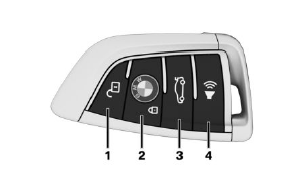
- Unlocking
- Locking
- Opening the trunk lid
- Press and hold or press three times in quick succession: panic mode Press briefly: pathway lighting
Unlocking the vehicle
 Press the button on the vehicle
key
Depending on the settings, either only the driver's door or all vehicle access points are unlocked.
If only the driver's door is unlocked, press the button on the vehicle key again to unlock the other vehicle access points.
 Press and hold the button on the
vehicle
key after unlocking.
The windows and the glass sunroof are opened, as long as the button on the vehicle key is pressed.
Locking the vehicle
- Close the driver's door.
 Press the button on the
vehicle key.All vehicle access points are locked.
Buttons for the central locking system
Overview
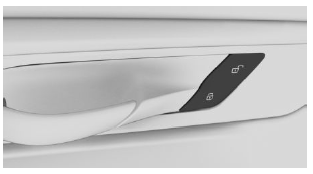
Buttons for the central locking system.
Locking
 Press the button with the front
doors
closed.
The fuel filler flap remains unlocked.
Unlocking
 Press the button.
Panic mode
You can trigger the alarm system if you find yourself in a dangerous situation.
 Press the button on the
vehicle key and hold for at least 3 seconds.- Briefly press the button on the vehicle key three times in succession.
To switch off the alarm: press any button.
READ NEXT:
 Comfort Access
Concept
The vehicle can be accessed without operating
the vehicle key.
Carrying the vehicle key with you, e.g., in your
pants pocket, is sufficient.
The vehicle automatically detects the vehicle key
Displays, control elements
In the vicinity of the steering wheel
Light switch element
Turn signal indicator, high beams
Instrument cluster
Wipers
Start/Stop button
Indicator/warning lights
Instrument cluster
The indica
SEE MORE:
Airbags- Protective effect
General information
Airbags are not triggered in every impact situation,
e.g., in less severe accidents.
Information on optimum effect of the
airbags
Warning
If the seat position is incorrect or the deployment
area of the airbags is impaired, the airbag
system cannot provide protection as intended
Front Axle
FRONT AXLE - RIDE HEIGHT
FRONT AXLE - RIDE HEIGHT F01/F02/REAR WHEEL
FRONT AXLE - RIDE HEIGHT AND REAR WHEEL SPECIFICATION
FRONT AXLE DIFFERENTIAL
FRONT AXLE DIFFERENTIAL F01/F02
FRONT AXLE DIFFERENTIAL SPECIFICATION
GENERAL - TRACK WIDTH / WHEELBASE
GENERAL - TRACK WIDTH/WHEELBASE F02 ALLR
GENERA
