
BMW 7 Series: Executive Lounge Seating
Concept
The Executive Lounge Seating function offers maximum legroom and increased traveling comfort to the rear passenger on the passenger's side.
General information
The following settings are applied automatically on system activation:
- The front passenger seat moves forward and adjusts the height, if necessary.
- The backrest and head restraint of the front passenger seat are inclined forward.
- The tilt of the screen in the rear is adjusted to the backrest incline of the front passenger seat.
- The footrest on the backrest of the front passenger seat folds out.
- The backrest reclines to the back.
The adjusted end position can be manually adjusted and if required stored using the memory function.
Safety information
 Warning
If the front passenger seat is set too far forward, the view of the exterior mirror on the front passenger side may be limited. There is a risk of accident. Adjust the front passenger seat such that the view on the exterior mirror is not obstructed.
Overview
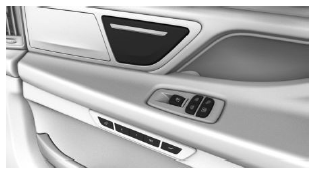
 Executive Lounge Seating
Switching on
 Press the button.
Resetting to standard position
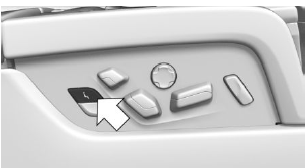
 Press the button to reset to
standard
position.
The process is canceled if the button is pressed again.
READ NEXT:
 Massage function
Concept
Depending on the program, the massage function
ensures relaxed muscles and better blood
circulation and can avoid fatigue.
General information
Eight different massage programs can be selected:
Seat and armrest heating
Concept
The system heats seats and armrests as
needed.
General information
Seat heating can also be used without armrest
heating. Deactivate the armrest heating as
needed.
Overview
Front
Seat and a
Active seat ventilation
Concept
Integrated fans in the seat and armrest areas
provide a comfortable seat temperature.
Overview
Front
Active seat ventilation
Rear
Active seat ventilation
Switching on
Press the button onc
SEE MORE:
Tires
Replacing A Runflat Tire Or A UHP Tire
NOTE: UHP tire = Ultra High Performance tire
UHP tires are tires with an aspect ratio (H:B) < or = 45 % or tires with a speed
index > or = "V"
NOTE: Follow the fitting machine manufacturer's operating instructions.
It is absolutely essential to ensure th
Functions
Function Overview
Comfort Access is divided into the following functions:
Passive Entry
Passive Go
Passive Exit.
ID transmitters are required for Comfort Access to function.
An ID transmitter comprises, among other things:
A battery
Remote control function
Transponder coil for emergency st
