
BMW 7 Series: Seat and armrest heating
Concept
The system heats seats and armrests as needed.
General information
Seat heating can also be used without armrest heating. Deactivate the armrest heating as needed.
Overview
Front
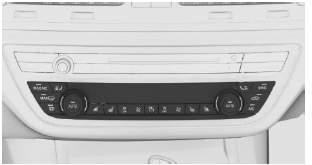
 Seat and armrest heating
Rear
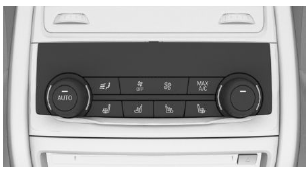
 Seat and armrest heating
Switching on
 Press the button once for each
temperature
level.
The maximum temperature is reached when three LEDs are lit.
When ECO PRO is activated, the heating output is reduced.
If the trip is continued within approx. 15 minutes after a stop, seat and armrest heating is activated automatically with the temperature selected last.
Additional information: ECO PRO
Switching off
 Press and hold the button until
the bar
display on the climate control display
goes out.
Seat heating distribution
The heating action in the seat cushion and the seat backrest can be distributed in different ways.
Via iDrive:
- "CAR"
- "Settings"
- "Climate control"
- Select the desired menu item.
- Select desired seat.
- Press the Controller and turn it to set the seat heating distribution.
Switching armrest heating on/off
Via iDrive:
- "CAR"
- "Settings"
- "Climate control"
- "Seat and armrest heating"
- Select desired seat.
- "Heat armrests with seat"
READ NEXT:
 Active seat ventilation
Concept
Integrated fans in the seat and armrest areas
provide a comfortable seat temperature.
Overview
Front
Active seat ventilation
Rear
Active seat ventilation
Switching on
Press the button onc
The right place for children
Vehicle features and
options
This chapter describes all standard, country-specific
and optional features offered with the series.
It also describes features and functions that are
not necessarily ava
SEE MORE:
Propeller Shaft
PROPELLER SHAFT, GENERAL
IMPORTANT: Specifications on propeller shaft deflection angles are only
possible on request
with the vehicle identification number of the problem vehicle via PuMA.
PROPELLER SHAFT DEFLECTION ANGLES
IMPORTANT: Specifications on propeller shaft deflection angles for the F
se
Electrical Steering Column Adjustment Normalization
NOTE: Normalization must be carried out after the following work:
Removal or replacement of control panel in heater-A/C system or of
steering column
Repair work to electric steering column adjustment
Coding/programming of IHKA control unit
Normalization of electric steering column adjustment i
