
BMW 7 Series: Rocker Arm With Bearing Mount
REMOVING AND INSTALLING/RENEWING ROCKER ARMS ON RIGHT SIDE (N63)
Necessary preliminary work
(cylinder bank 1 to 4)
- Remove INLET AND EXHAUST ADJUSTMENT UNIT on right side.
- Remove right INLET CAMSHAFT.
- Remove right EXHAUST CAMSHAFT.
IMPORTANT: Used rocker arms (1) may only be reused in the same position.
Tolerance classes are not required.
Remove rocker arm (1) and set down in neat order in special tool 11 4 480.
Install rocker arm (1).
Align all rocker arms (1) straight.
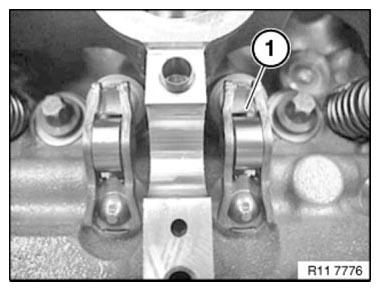
Fig. 282: Identifying Rocker Arm
Assemble engine.
REMOVING AND INSTALLING/REPLACING ALL ROCKER ARMS ON LEFT SIDE (N63)
Necessary preliminary work
(cylinder bank 5 to 8)
- Remove LEFT INLET CAMSHAFT.
- Remove left EXHAUST CAMSHAFT.
IMPORTANT: Used rocker arms (1) may only be reused in the same position.
Tolerance classes are not required.
Remove rocker arm (1) and set down in neat order in special tool 11 4 480.
Install rocker arm (1).
Align all rocker arms (1) straight.
.png)
Fig. 283: Identifying Rocker Arm
Assemble engine.
READ NEXT:
 Valves With Springs
REMOVING AND INSTALLING/REPLACING ALL VALVES (N63)
Necessary preliminary work
Remove LEFT CYLINDER HEAD.
Remove RIGHT CYLINDER HEAD.
Remove camshafts.
Mount cylinder head (1) on special tool 11
Replacing All Valve Springs (N63)
Necessary preliminary work
Remove LEFT CYLINDER HEAD.
Remove RIGHT CYLINDER HEAD.
Remove camshafts.
Mount cylinder head (1) on special tool 11 9 000.
Fig. 292: Mounting Cylinder Head On Special
Replacing All Valve Stem Seals (N63)
Notes
IMPORTANT: Risk of damage to sealing lip on valve stem seal.
Fit new valve stem seals only when all valves have been installed.
Necessary preliminary work
Remove all VALVE SPRINGS.
Press spe
SEE MORE:
Replacing Entrance With Door Post, Left And Right (Partial
Replacement, B-pillar)
Observe procedure of REPAIR STAGE 3.
Read CONTENTS OF BODY, GENERAL.
Spot-weld bonding is used on this vehicle. Observe specific PROCEDURE.
Use only approved spot-welding apparatus for repairs.
Place vehicle on straightening bench.
The following new body parts are required (see BMW Electronic P
In the vicinity of the center console
Control Display
Ventilation
Hazard warning system
Intelligent Safety
Glove compartment
Radio/multimedia, see Owner's Manual for
Navigation, Entertainment, and Communication
Automatic climate control
Controller with buttons
Parking brake
Automatic Hold
PDC Park Distance Control
Wi
