
BMW 7 Series: Audio, Navigation And Information Systems
KNIFE
Knife MW
Note: (Cutting knife set for roof-mounted aerial (empty housing) ) special tool for manual operation only. 65 2 011 Drawing knife with plastic sleeve; 65 2 012 Pull handle with plastic sleeve, 65 2 013. Special blade is replaced by 65 2 014 Special blade
SI number
01 15 08 (475)
Consisting of:
2 = 0495112 Handle
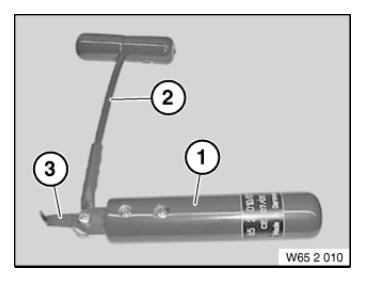
Fig. 1: Identifying Knife (652010)
NOTE: (Pull handle)
1 = 0495113 Handle
NOTE: (Drawing knife with plastic sleeve)
3 = 0495114 Blade
NOTE: (Special blade) Replaced by 65 2 014 (0496 531)
4 = 0496531 Blade
NOTE: (Special blade) Replaced by special tool 65 2 013 since 08/2008.
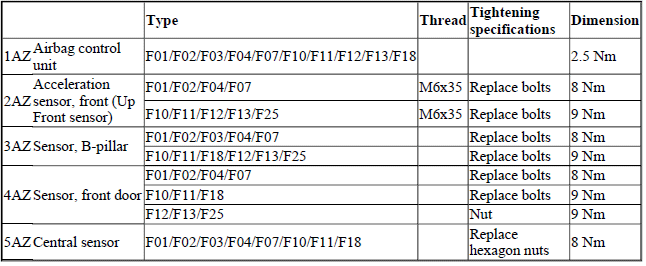
AIRBAG TRIGGERING CONTROL
TIGHTENING TORQUE SPECIFICATION - AIRBAG TRIGGERING CONTROL
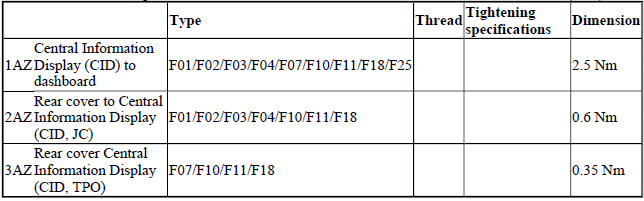
CENTRAL INFORMATION DISPLAY (CID)
TIGHTENING TORQUE SPECIFICATION - CENTRAL INFORMATION DISPLAY (CID)
PEDESTRIAN PROTECTION
TIGHTENING TORQUE SPECIFICATION - PEDESTRIAN PROTECTION

REAR-COMPARTMENT MONITOR
TIGHTENING TORQUE SPECIFICATION - REAR-COMPARTMENT MONITOR

READ NEXT:
 Adjusting Gear Lever (Parking Lock Emergency Release)
NOTE: Check cable for ease of movement.
Move gear selector switch to "P" position.
Control for emergency release must not be actuated.
Unfasten nut.
Disconnect cable (1).
Installation:
Release nu
SEE MORE:
Technical Data
FRONT BRAKE F01/F02/F07
FRONT BRAKE SPECIFICATION
REAR BRAKE
REAR BRAKE DISCS F01/F02/F07
REAR BRAKE DISCS SPECIFICATION
PARKING BRAKE F01, F02
PARKING BRAKE SPECIFICATION
Brakes - Tightening Torques
F01 TESTING AND BLEEDING BRAKES
TESTING AND BLEEDING BRAKES
TIGHTENING TORQUE SPECIFICATION - T
El.Valve For Exh. Gas Recirculation
REPLACING BOTH PRESSURE CONVERTERS FOR TURBOCHARGER (N63)
Necessary preliminary work
Partially release charge air cooler EXPANSION TANK.
Partially release AUXILIARY WATER PUMP for exhaust turbocharger (not
F04).
Disconnect plug connection at COOLANT THERMOSTAT.
Pressure converter, cylinders 1
